Feature
Smart PDF Forms
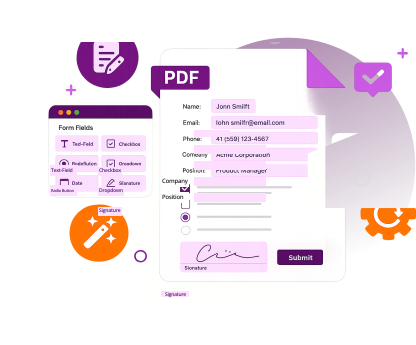
Fully automate your form-filling process with our best-in-class technology and jump ahead of your competitors.
Trusted by Some of the World's Largest Companies
Take a look at who uses our technology.







The Best Tools for Developers
Test for Yourself
Programmatically show/hide fields, add conditional logic, create interactive elements and much more with a few lines of code. Plug our forms into your database to automatically pre-populate them, or automatically update databases upon form submission.Try an FDF export in your application using this code:
public class FDFImportExport {

private static String output_path = "your default output path";
private static String input_path = "your default input path goes here";

    public static void main(String[] args) throws PDFException {

        int error_code = Library.initialize(sn, key);
        if (error_code != e_ErrSuccess) {
            System.out.println("Library Initialize Error: " + error_code);
            return;
        }
        try {

        	Range empty_range = new Range();
             //The code below imports a FDF file to your PDF and fills the form fields accordingly
            {
                String input_file = input_path + "Sample.pdf";
                String fdf_file = input_path + "SampleData.fdf";
                PDFDoc pdf_doc = new PDFDoc(input_file);
                error_code = pdf_doc.load(null);
                if (error_code != e_ErrSuccess) {
                    System.out.println("The Doc " + input_file + " Error: " + error_code);
                    return;
                }
                FDFDoc fdf_doc = new FDFDoc(fdf_file);
                pdf_doc.importFromFDF(fdf_doc, e_Annots, empty_range);
                String output_file = output_path + "Sample_importFDF.pdf";
                pdf_doc.saveAs(output_file, e_SaveFlagNoOriginal);
            }
Full Control of Your Form Data
Field Validation with Conditional Logic
Add field validation programmatically by setting rules for email address, phone number, and date fields for a smoother form-filling process. For example, you can set a format rule for date fields so users in Europe and North America can write dates the way they’re used to.
Integrating Paper and Electronic Forms
OCR scanning to bring existing forms from paper to digital. Integrating paper and digital forms ensures your users are doing what your business needs them to do, every step of the way.
Linking Forms to Databases
Automatically send a submitted form as a FDF file to your database, updating relevant fields without manual data entry. Foxit PDF SDK also supports exporting form data to XFDF files and XML, if you’re working with XFA forms.
Essential Capabilities
Reduced Data Entry Errors
Give users the ability to fill out digital forms on the go with their device of choice. Apps have never been more productive!
Secure Personal Data Sharing
Use ink signatures to let customers sign documents in their digital devices. Sign PDF in web apps easily without needing to print a file to sign again!
Lower Processing Costs Across the Board
Our PDF SDK provides full support for displaying and annotating PDF in web applications with an extensive range of functions for creating, editing or importing/exporting annotations.
More Features
Fillable smart PDF form fields
Dynamic and interactive fields
Conditional form field logic
Linked databases using XML, FDF, XFDF
File attachments for submission
Digital and ink signatures within forms
Perform Specific Tasks
Industry Use Cases

Securely Capture Patient Data
Doctors, dentists and other healthcare professionals need a lot of information from a patient in order to diagnose them. Including conditional formatting and connecting forms to your patient database means smarter information gathering and automatically updated patient files without involving team members.
Learn More
Automatic Quotes and Application Signoff
Banking and insurance are fast paced industies that need things done yesterday in most cases. Use smart PDF forms to automate quotes and sign off on low revenue applications, freeing up teams to spend time on more worthwhile tasks, like winning bigger deals.
Learn More
Better Information Gathering
Tailor forms so that questions appear respective of the person who is filling it out. This will make sure that all information is gathered, including blueprints and compliance documentation, and decrease the amount of time taken to collect data for project updates.
Learn MoreReady to Develop Your PDF Solution?
Web Demo
Try our SDK for Web in your browser. No download or login required.
Ready to get started?
Licensing tailored to you
Our sales engineers are PDF experts and coders by trade. They'll answer any technical questions, help you build a proof of concept, and create a license that suits your needs.
30-day free trial
Try our advanced PDF technology on your chosen platform(s), completely free, for 30 days.