
Foxit PDF SDK — Mobile (including HarmonyOS)
Foxit PDF SDK for mobile helps you integrate Foxit PDF technology quickly into mobile and HarmonyOS apps. Even with limited PDF experience, you can build professional PDF readers on mobile and HarmonyOS using the Foxit development kit.
Supported platforms:
SDK architecture
The mobile SDK has three core components shared across platforms for easier integration and cross-platform support.
| Component | Role | Platforms and delivery |
|---|---|---|
| UI Extensions | Open-source library (or project) with built-in UI: text selection, annotations, navigation, bookmarks, search, form filling, reflow, attachments, signatures, editing, encryption, and more | Android: FoxitRDKUIExtensions.aar iOS: uiextensionsDynamic.framework (xcframework supports Mac Catalyst) HarmonyOS Next: FoxitRDKUIExtensions.har |
| PDF View Control (PDFViewCtrl) | Basic PDF display control with high-quality rendering, zoom, scroll, and page navigation | Android: FoxitRDK.aar iOS: FoxitRDK.framework (xcframework supports Mac Catalyst) HarmonyOS Next: FoxitRDK.har OpenHarmony: FoxitRDK.har |
| PDF Core SDK | Low-level PDF APIs: rendering, text extraction, search, forms, signatures, encryption, annotations, and more | All platforms; packaged in each platform’s FoxitRDK package |
Tip
- OpenHarmony does not currently provide the UI Extensions component.
- macOS reuses the iOS SDK via Mac Catalyst; no separate integration is required.
UI Extensions (full-feature UI)
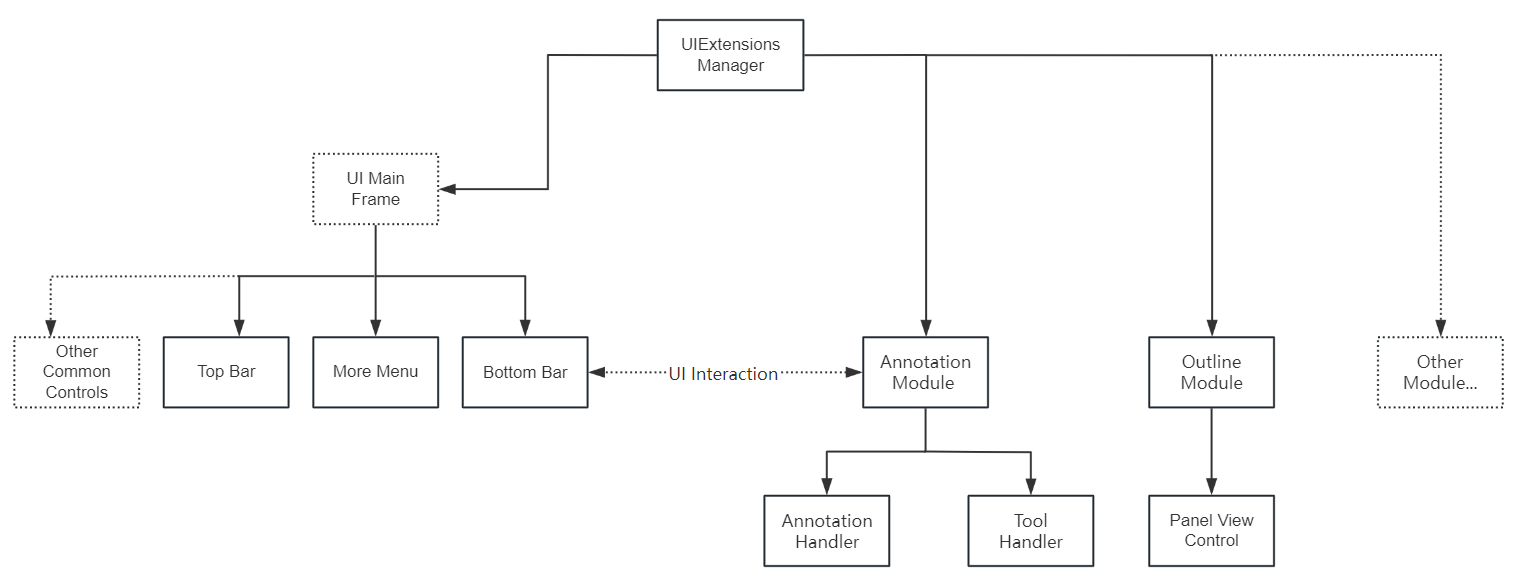
UI Extensions uses a modular design: each feature is a separate module. By default, all modules load except the file management module. Implement the Module interface for custom modules and use UIExtensionsManager registerModule / unregisterModule to register or unregister them.
UIExtensionsManager includes the main framework UI (top/bottom toolbars) and shared UI used across modules. It routes messages and events from PDF View Control to feature modules. When modules load, they adapt the main framework UI and wire up event handling.
Relationship between UIExtensionsManager and modules:
PDFViewCtrl (core interaction)
PDFViewCtrl is a utility class for interacting with the rendered PDF document. Built on Foxit PDF rendering, it supports fast, high-quality rendering, zoom, scroll, and page navigation. It extends the platform-specific Viewer class and can be extended further.
PDF Core SDK
PDF Core SDK is the core of the SDK, based on Foxit’s underlying PDF technology. It provides rendering, parsing, extraction, search, forms, signatures, handwriting, certificates, encryption, annotations, and more for high performance and efficiency.
Feature comparison
| Feature | Description | Android | iOS | HarmonyOS Next | OpenHarmony |
|---|---|---|---|---|---|
| Document operations | Open and close files; get and set metadata | √ | √ | √ | √ |
| Page operations | Parse, render, read, and edit document pages | √ | √ | √ | √ |
| Rendering | Create image rendering engine on Bitmap | √ | √ | √ | √ |
| Reflow | Reflow page content to fit the screen | √ | √ | √ | √ |
| Cropping | Crop PDF pages | √ | √ | √ | √ |
| Text selection | Select and copy text on pages | √ | √ | √ | x |
| Text search | Text search, including full-text index search | √ | √ | √ | √ |
| Outline | Navigate and link to points of interest in the document | √ | √ | √ | √ |
| Reading bookmark | Mark pages and paragraphs of interest | √ | √ | √ | x |
| Annotations | Create, edit, and remove annotations | √ | √ | √ | √ |
| Layers | Add, edit, and remove PDF layer content | √ | √ | √ | √ |
| Attachments | Add, edit, and remove document-level attachments | √ | √ | √ | √ |
| Forms | JavaScript form filling; import/export form data via XFDF/FDF/XML; text fields, checkboxes, radio buttons, combo boxes, list boxes, signature fields | √ | √ | √ | √ |
| XFA | Static and dynamic XFA | √ | √ | √ | √ |
| Signatures | Sign PDFs, verify signatures, add/remove signature fields; third-party digital signatures and LTV | √ | √ | √ | √ |
| Fill and sign | Fill flattened (non-interactive) forms with text and symbols | √ | √ | √ | √ |
| Security | Password and certificate encryption | √ | √ | √ | √ |
| Zoom navigation | Adjust view zoom and position to match a rectangle in the thumbnail view | √ | √ | x | x |
| Print PDF documents | √ | √ | x | x | |
| RMS | RMS decryption per Microsoft IRMv1 and IRMv2 | √ | √ | x | x |
| Document comparison | Compare two PDFs and highlight differences | √ | √ | √ | √ |
| Scanning | Scan paper documents and convert to PDF | √ | √ | x | x |
| Read aloud | Read text in PDF documents aloud | √ | √ | x | x |
| Split screen | Split-screen display | √ | √ | √ | x |
| Right-to-left | RTL (right-to-left) layout | √ | √ | √ | √ |
| Memory recovery | Recover from out-of-memory conditions | √ | √ | √ | x |
Note
- Outline is a PDF specification term; desktop PDF readers often call it “bookmarks.”
- Reading bookmark is common in mobile and tablet readers to mark reading progress or interesting passages. Reading bookmarks are not outlines technically—they are stored in the app, not in the PDF file.